FluxStore 5.6.0 focuses on Flutter 3.38, WhatsApp ordering, and rental products. The release notes below preserve the official feature details, configuration examples, and fixes published by InspireUI.
Released January 21, 2026. View the official FluxStore WooCommerce changelog.
NEW FEATURE
Latest Update: The January 21st release fixes the search issue.
Flutter 3.38.5 Upgrade
Upgrade latest Flutterchannel stable v3.38.5
To make sure you are using the correct Flutter version, run this command:
flutter --version
To upgrade Flutter 3.38.5 , please close all your IDE and run these commands in the project folder
flutter channel stable
flutter upgrade --force
flutter clean
flutter pub get
To update/migrate the app to the latest version
- Follow this “Upgrade source code and Flutter” guide.
- Input your purchase code to
configs/env.propsfile (if not input, the app will crash):
- Helpful guide “How To Easily Upgrade Sourcecode To The Next Version”
To fix build issue with new flutter version
After upgrading, you may meet the cache issue of iOS while building the application, please run this command to fix:
flutter precache --ios
Full Support for Xcode 26 & iOS 15 Minimum Deployment
- Fully compatible with Xcode 26, ensuring smooth builds and future-proof iOS development.
- Minimum iOS deployment target has been upgraded to iOS 15.0 (previously iOS 14.0).
Notice
This update drops support for iOS 14 and earlier versions due to Xcode 26 and latest iOS SDK requirements.
FiboSearch Integration

Added support for FiboSearch, enabling a faster and smarter product search experience for WooCommerce stores.
- Seamless integration with the FiboSearch (Ajax Search) plugin.
- Displays instant search results while typing, without page reloads.
- Improves search accuracy and product discovery for users.
- Fully compatible with existing FluxStore search UI and product data.
Configuration
- Edit in the
lib/env.dartfile as below
  "searchConfig": {
    /// Enable Ajax Search using either AjaxSearchPro or FiboSearch plugin
    /// ref: https://support.inspireui.com/help-center/articles/35/37/196/ajax-search-pro
    "ajaxSearch": {
      "enable": true,
      "plugin": "fiboSearch" //fiboSearch, ajaxSearchPro
    },

    /// Enable search by SKU in search screen
    "enableSkuSearch": true
  }
WhatsApp Order Integration
Added support for WhatsApp Order
- Allow customers to send their order details directly via WhatsApp after a successful checkout.
- Integrate seamlessly with the existing payment flow.
- Message templates are fully customizable, with order information automatically populated for convenience.
- Support Native payment only (not support webview payment).
Configuration
- Edit in the
lib/env.dartfile as below
{
  "whatsAppOrderConfig": {
    "phoneNumber": "12124567890",
    "message": "Hello, I would like to place an order. Here are the details:\n\n{order_details}\n\nTotal Amount: {total_amount}\n\nThank you!",
    "paymentMethodIds": [
      "lwc-whatsapp-order"
    ],
    "autoOpenWhatsAppAfterOrder": false
  }
}
- Support these replaced params:
{billing_name},{billing_email},{billing_phone},{billing_address},{shipping_name},{shipping_email},{shipping_phone},{shipping_address},{order_id},{order_details},{total_amount}
Video Splash Screen
Make a strong first impression with the new Video Splash Screen feature.
- Supports video playback on app launch instead of static images.
- Ideal for branding, promotions, or storytelling.
Configuration
- Edit in the
lib/env.dartfile as below:
  "splashScreen": {
    "enable": true,

    /// duration in milliseconds, used for all types except "rive", "flare" and "video"
    "duration": 2000,

    ///  Type should be: 'fade-in', 'zoom-in', 'zoom-out', 'top-down', 'rive',
    ///  'flare', 'static', 'video'
    "type": "video",
    "image": "assets/videos/splashscreen.mp4", // https://demo.mstore.io/wp-content/uploads/2025/09/splashscreen.mp4

    /// AnimationName's is used for 'rive' and 'flare' type
    "animationName": "fluxstore",

    "boxFit": "contain",
    "backgroundColor": "#ffffff",
    "paddingTop": 0,
    "paddingBottom": 0,
    "paddingLeft": 0,
    "paddingRight": 0,
  },

Auction Product Support
- Added support for the plugin WooCommerce Auctions - WordPress Simple Auctions , allowing customers to place bids directly from the app.
- Displays key auction information such as current bid, starting price, bid increment, auction start/end time, and auction status.
- Supports real-time bid updates when users refresh the product detail screen.
- Available for Extended license.

Rental Product
Added support for Rental Products for WooCommerce plugin****.
- Allow customers to select rental dates directly on the product detail screen.
- Rental availability is validated in real time, and pricing is calculated accurately throughout the cart and checkout flow.
- The feature supports for Extended license.
Configuration
- Edit in the
lib/env.dartfile as below:
"EnableRentalProductsWoo": true,

Social Login on Registration Screen
Added Social Login on the Registration screen.
- Users can sign up instantly using supported social accounts.
- Reduces friction during account creation.
- Helps increase conversion and user retention.
Configuration
- Edit in the
lib/env.dartfile as below:
 "loginSetting": {
    "showAppleLogin": true,
    "showFacebook": false,
    "showSMSLogin": true,
    "showGoogleLogin": true,
+   "showSocialInRegistration": false,
 }
Show / Hide Sign In & Sign Up on Onboarding
More control over your onboarding flow.
- Choose whether to display Sign In and Sign Up buttons on onboarding screens.
- Ideal for guest-first experiences or content-first apps.
Configuration
- Edit in the
lib/env.dartfile as below: - Support for Onboarding version 1 only
  "onBoardingConfig": {
    'enableOnBoarding': true,
    'version': 1,
    'autoCropImageByDesign': true,
    'isOnlyShowOnFirstTime': true,
    'showLanguage': true,
    'showLanguagePopup': false,
+   // Currently, only available for version 1
+   'showSignInSignUp': true,
  },
Short Description on Product Card
Added a new option to control the visibility of short product descriptions.
- Easily show or hide short descriptions on the product detail screen.
- Useful for clean layouts or minimal product pages.
Configuration
- Edit in the
lib/env.dartfile
  "productCard": {
    "defaultImage": 'assets/images/no_product_image.png',
    'showShortDescription': true,
    ...
  },
- Edit directly for design layouts in the
lib/config/config_en.jsonfile, for example:
{
   "HorizonLayout":[
      {
         "layout":"",     ///twoColumn, threeColumn, fourColumn, card, saleOff, listTile, quiltedGridTile, carousel
         "showShortDescription":true,
         ...
      }
   ],
   "VerticalLayout":{
      "layout":"",     ///pinterest, menu, card, columns, columnsWithFilter, topProducts, menuWithCustomCategories
      "showShortDescription":true,
      ...
   }
   "TabBar": [
      {
         "layout": "category",
         "categoryLayout": "card",     ///card, sideMenuWithSub, columns, topMenu, animation, grid, sideMenuWithSub,
                                                          ///sideMenuWithGroup, ///multi-level, ///fancy-scroll
         "icon": "assets/icons/tabs/icon-category.png"
      },
   ],
   ...
}
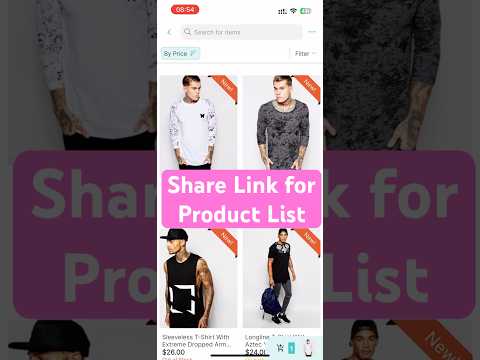
Share Link for Product List Configuration
Improved the Share Link feature to support more flexible product list configurations.
- Remove previous limitations in link creation, ensuring shared links always navigate to the intended screen regardless of layout configuration.
- Users can now generate and open share links correctly even when layouts are / are not tied to a specific category, brand, or tag.
Brand Layout Update
Updated the Brand layout to provide more flexible brand presentation and configuration.
- Support customizable image display.
- Allow highlighting specific brands list.
Configuration
- Edit in the
lib/config/config_en.jsonas below:
    {
        "name": "Brands",
        "layout": "brand",
        ...
        "imageBoxFit": "contain",
        "topBrand": [] // ID of brands
    },
IMPORTANT UPDATE
- Upgrade(ios): migrate
OneSignalNotificationServiceExtensionto adapt with Xcode 26 - Allow to hide contact information in the store details screen
- Improve(UI): show login prompt for WebView auth
- Support loadmore in Menu with Custom Categories
- Support multilingual for time ago in Realtime Chat
- Chore: update phone field labels to comply with App Store guideline 5.1.1
This release contains many fixes
- Fixed: Build ios due to recent FBSDKCoreKit release
- Fixed: Slider video audio still plays for a millisecond then cuts off
- Fixed: Not show categories when changing language
- Fixed: Open product from side menu
- Fixed: Remapped category images not overriding default icons
- Fixed: Duplicate when refresh & load more
- Fixed: Blog filter bug
- Fixed: Skip hidden product on store details
- Fixed: Onboarding image v2 is blurry
- Fixed: Youtube video is not available
- Fixed (share_plus): Avoid crash on iOS 26 when sharing
- Fixed (Loyalty): fix to show warning Firebase after login success
- Fixed: Fix to convert amount to points
- Fixed: Cannot download the downloadable variable products
- Fixed (OfflineMode): Doesn't support offline mode for PWA
- Fixed: Some UI is incorrect in mobile PWA
- Fixed (Webview): Handle permission camera & mic for android
- Fixed (Webview): download base64 image to file
- Fixed: Delayed when update price rates if enable MStore API caching
- Fixed: Razorpay payment not working
How to update/migrate the app to the latest version?
- Follow this “Upgrade source code and Flutter” guide.
- Input your purchase code to
configs/env.propsfile (if not input, the app will crash):

- Helpful guide “How To Easily Upgrade Sourcecode To The Next Version”
How to activate FluxStore on FluxBuilder tool?
- Follow this guide:
[support.inspireui.com
https://support.inspireui.com/help-center/articles/42/47/124/upgrade-source-code-and-flutter](https://support.inspireui.com/help-center/articles/42/47/124/upgrade-source-code-and-flutter)
- Input your purchase code to
configs/env.propsfile (if not input, the app will crash):