FluxStore 5.4.0 focuses on Android API updates, YITH add-ons, and direct sharing. The release notes below preserve the official feature details, configuration examples, and fixes published by InspireUI.
Released July 22, 2025. View the official FluxStore WooCommerce changelog.
NEW FEATURE
Core Features & Enhancements
1. Update Target API Level to Meet Google Play Requirements
The target API level for Android builds has been updated in accordance with the latest Google Play policies. This ensures continued app compatibility, improved performance, and access to new platform features while maintaining compliance with Google’s publishing standards.
2. Support for YITH Addons
This version supports the YITH WooCommerce Product Add-Ons plugin on Woocommerce site, allowing merchants to offer customizable product options such as checkboxes, radio buttons, text fields, and more directly within the app.
This integration enhances the product configuration experience and enables more flexible product offerings - ideal for stores that sell personalized or build-to-order items.
Support Platforms
- FluxStore Woocommerce
- FluxStore Pro (Woocommerce)
- FluxStore Multi Vendors
3. Support for Direct Link Sharing
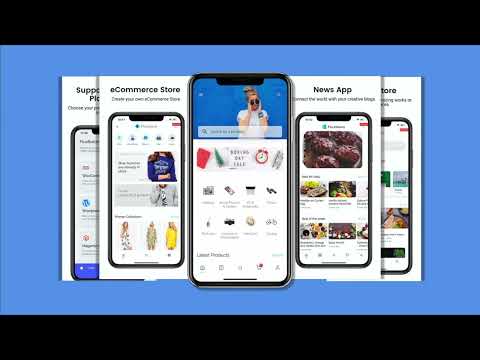
Allow users to share direct website links instead of using dynamic link providers like Branch.io or Firebase. When a shared link is opened, it will redirect to the website, not the mobile app - fully aligning with users who prefer standard URL sharing without app deep linking behavior.
Configuration
Edit the file lib/env.dart as below:
  "dynamicLinkConfig": {
    "type": "selfhosted",
  },

4. New Video Shopping UI Styles
Multiple new video shopping user interface styles have been added, allowing for more engaging and visually appealing product presentations tailored to modern shopping trends.
Support Platforms
- FluxStore Woocommerce
- FluxStore Pro (Woocommerce)
- FluxStore Multi Vendors
- FluxStore Shopify
Configuration
Edit the file lib/configs/config_en.json as below:
"TabBar": [
    {
      "layout": "videos",
      "styleVersions": [ // Add the versions you want to display here. You can arrange them in any order you prefer. If not set, only version 1 will be used as the default.
        "1",
        "2",
        "3",
        "4",
        "5",
        "6",
        "7",
        "8",
        "9"
      ],
      "icon": "assets/icons/tabs/icon-videos.png"
    }
5. Order Attribution Tracking via WebView Checkout
Support for tracking order attribution through WebView-based checkouts has been added. This enhancement allows for accurate conversion tracking when customers complete purchases within embedded browser sessions in the mobile app.
Support Platforms
- FluxStore Woocommerce
- FluxStore Pro (Woocommerce)
- FluxStore Multi Vendors
6. Display Product Category on Product Cards
Product cards now optionally display associated categories, improving product context and assisting users in browsing products more efficiently.
Support Platforms
- FluxStore WooCommerce
- FluxStore MultiVendor (Dokan/WCFM)
- FluxStore Shopify
- FluxStore Listing (Listeo/ListingPro/MyListing)
- FluxStore Pro
- FluxStore Strapi
- FluxStore Prestashop
- FluxStore Notion
- FluxStore BigCommerce
- FluxStore Haravan
Configuration
- Edit the file
lib/configs/config_en.jsonas below:
{
   "HorizonLayout":[
      {
         "layout":"",     ///twoColumn, threeColumn, fourColumn, card, saleOff, listTile, quiltedGridTile, carousel
         "showProductCardCategory":true,
         "showListingType":true,
         ...
      }
   ],
   "Vertical Layout":{
      "layout":"",     ///pinterest, menu, card, columns, columnsWithFilter, topProducts, menuWithCustomCategories
      "showProductCardCategory":true,
      "showListingType":true,
      ...
   }
   "TabBar": [
      {
         "layout": "category",
         "categoryLayout": "card",     ///card, sideMenuWithSub, columns, topMenu, animation, grid, sideMenuWithSub,
                                                          ///sideMenuWithGroup, ///multi-level, ///fancy-scroll
         "icon": "assets/icons/tabs/icon-category.png"
      },
   ],
   ...
}
- Edit the file
lib/env.dartas below:
  "productCard": {
    "defaultImage": 'assets/images/no_product_image.png',
    "showProductCardCategory": true,
    "showListingType": true,
    ...
  },
Localization and International Support
7. Support for Amharic Language
Amharic has been added to the list of supported languages, enabling localization for users in Ethiopia and expanding the global reach of your application.
8. Support for Saudi Riyal Symbol (SAR)
The correct symbol for the Saudi Riyal currency is now supported, ensuring accurate display of currency values for stores operating in Saudi Arabia.
Configuration
Edit the file lib/env.dart as below:
  "advanceConfig": {
    ...,
    "Currencies": [
      ...,
      {
        'symbol': '\ue900',
        'decimalDigits': 2,
        'symbolBeforeTheNumber': true,
        'currency': 'Saudi Riyal',
        'currencyCode': 'SAR',
      }
    ]
  }
Advanced Configurations and Platform Enhancements
9. Flexible Shipment Tracking Configuration
This update introduces greater control over the shipment tracking experience within the app:
- Custom Tracking URL Support
Store owners can now configure their own tracking URLs, enabling integration with third-party logistics providers or custom-built tracking systems.
- Option to Disable AfterShip Integration
A new setting allows AfterShip tracking to be disabled entirely, providing more flexibility for merchants who prefer alternative tracking methods or wish to manage logistics independently.
Support Platforms
- FluxStore Woocommerce
- FluxStore Pro (Woocommerce)
- FluxStore Multi Vendors
Configuration
Edit the file lib/env.dart as below:
  "afterShip": {
+   "enabled": true,
    "tracking_url": "https://fluxstore.aftership.com", // Old URL, not using if `custom_tracking_url` is not empty
+   "custom_tracking_url": "https://fluxstore.aftership.com/{slug}/{trackingNumber}", // Default null
},
10. Instagram Story: Separated Display Time per Slide
The Instagram Story layout now supports individual display durations for each item:
- If a specific time is set per item to that time is used
- If not set to fallback to the video’s duration (if available)
- If video duration is not available to use the global default setting
This logic ensures optimal flexibility while maintaining a smooth storytelling experience.
Configuration
Edit the file lib/configs/config_en.json as below:
          {
            "time": 5,
            "items": [
              {
                "id": "[#6ade0]",
                "image": "https://trello.com/1/cards/685321344e242df4e72be312/attachments/685b60f57568cc0b3a6825c8/download/David_Arizona_2025_-_IG_Reels_Promo_Voice_Actors.jpg",
                "video": "https://animewonderfest.com/wp-content/uploads/2025/06/IG-Reel-arizona-Promo-David-Matranga.mp4"
              },
              {
                "id": "[#aa32b]",
+               "time": 15, // default null
                "image": "https://trello.com/1/cards/685321344e242df4e72be312/attachments/685b6044be49b99d81f5342b/download/Matthew_Promo_-_Arizona_2025_-_Reels_-_Announcement_Posts.jpg",
                "video": "https://animewonderfest.com/wp-content/uploads/2025/06/IG-Announcement-Arizona-Promo-Matthew-Rudd.mp4"
              }
            ],
            "limit": 10,
            "layout": "instagramStory",
            "usePath": false,
            "itemWidth": 100,
            "marginTop": 10,
            "hideAvatar": false,
            "itemHeight": 200,
            "marginLeft": 15,
            "viewLayout": "media",
            "hideCaption": false,
            "itemSpacing": 16,
            "marginRight": 15,
            "marginBottom": 10,
            "enableBackground": false,
            "itemBorderRadius": 10
          }
11. Listing: Owner Role Registration Support
This update introduces support for owner role registration within the Listing app. Users can now register as business owners directly from the app interface.
Support Platforms
- FluxStore Listing
Configuration
- Install Mstore API plugin version 4.18.0 or higher.
- Edit the file
lib/env.dartas below:
  "vendorConfig": {
    ...
    /// Show Register by Owner (Only for Fluxstore Listing)
    "OwnerRegister": true/false,
    ...
}
12. Custom Search Type Configuration for Products and Listings
Search behavior can now be customized for both product and listing modules. This is particularly beneficial for users utilizing combined solutions like Listeo and Dokan.
- Support search product in Listeo merge Dokan widgets
- Support History Text and Recent Searches by productType
- Handle logic show QRCode by productType and platform
Configuration
Edit the file lib/configs/config_en.json as below for:
- AppBar
        {
            "layout": "logo",
            "showSearch": true,
            "showLogo": true,
            "productType": true/false,
            ...
        },
- Header Search
        {
            "layout": "header_search",
            "productType": true/false,
            ...
        },
- Header Text
        {
            "layout": "header_text",
            "productType": true/false,
            ...
        },
- Banner Image
        {
            "layout": "bannerImage",
            "title": {
                "productType": true/false,
                ...
            },
            ...
        },
13. Support Large Category UX
Added new configuration option to support large category collections with an improved user navigation experience (compatible with WooCommerce platform)
    "categoryConfig": {
      // Enable this option when the store has more than 100 category items
      "enableLargeCategories": true,
      "deepLevel": 3,
    },
FluxStore MAX Enhancements
14. Multi-site Switcher Layout (FluxStore MAX Support)
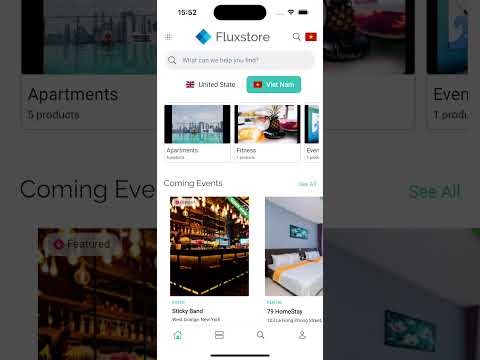
A powerful new feature has been introduced to improve the multi-site experience in FluxStore apps: the MultiSiteSwitcherLayout. This layout enables a fully customizable UI for selecting between multiple storefronts within a single mobile app.
Core Components:
MultiSiteSwitcherConfig: Defines the layout’s global settings and style.MultiSiteSwitcherStoreConfig: Handles individual store styling and folder mapping.MultiSiteSwitcherLayout: The main widget that renders the switcher UI based on the config.
Key Capabilities:
- Customizable Appearance:
Developers can define layout properties such as background color, spacing, border radius, and image display for each store.
- Dynamic Store Configuration:
Each store can have its own icon, selected-state image, and color. The configuration supports both default and selected styles.
- Flexible UI Controls:
Optional properties like button size, spacing, and image fit modes give you full control over the layout design.
- Integration with
env.dart:
You can configure the visibility of the store switcher button in the app bar using showAppBarSwitcherSite under multiSiteConfigs.
AppBar Switcher Button:
To enable or hide the site switcher button in the AppBar, update the corresponding store’s config in the file lib/env.dart:
"multiSiteConfigs": [
  {
    "configFolder": "us_store",
    "showAppBarSwitcherSite": true
  }
]
Configuration Example
Edit the file lib/configs/config_en.json as below:
{
  "layout": "multiSiteSelection",
  "backgroundColor": "#FFEAD5",
  "borderRadius": 10.0,
  "widthButton": 120.0,
  "heightButton": 35.0,
  "spacing": 10.0,
  "stores": [
    {
      "folder": "us_store",
      "image": "https://example.com/us-flag.png",
      "imageSelected": "https://example.com/us-flag-selected.png",
      "colorSelected": "#3FC1BE"
    },
    {
      "folder": "vi_store",
      "image": "https://example.com/vn-flag.png",
      "imageSelected": "https://example.com/vn-flag-selected.png",
      "colorSelected": "#FF6B6B"
    }
  ]
}
15. Shopify Support for FluxStore MAX
FluxStore MAX now officially supports Shopify as a backend platform, enabling high-performance native apps for Shopify merchants.
Important Note: Don't support multiple platforms at the same time, sites should only have the same type of platform (Shopify or Woocommerce only).
15. Update currency and country based on site config
introduces the ability to update the app's currency and country settings based on the multiSiteConfig.
Key changes:
- Added
_updateCurrencyForSitemethod to handle updating currency and country when a new site configuration is selected. - If the site config specifies a
currencyCode, the app will attempt to find a matching currency from thekAdvanceConfig.currencieslist. - If a
countryCodeis also provided in the site config, it will override the country code of the found currency. - If the site config's
currencyCodeis not found or not provided, the app will fall back to thekAdvanceConfig.defaultCurrency. - The
getPrefConfigmethod now prioritizes currency and country settings frommultiSiteConfigbefore falling back tokAdvanceConfig.defaultCurrencyor persisted settings. - When changing the multi-site configuration via
changeMultiSite, the currency and country are now updated according to the new site's settings.
IMPORTANT UPDATE
- Clarify address infor
- Confirmation dialog for Order Cancellation and Refund
- Show corresponding error code when creating user
Improve AppBar address handling and display
- Load state and country names for first app launch and full address after selection
- Improve address format display in AppBar and address selection screen
- Implement automatic address synchronization with CartModel
- Optimize PlacePicker initial map loading
- Add stock quantity in Back Order Products
- Update (productListLayout): optimize shop product list layout
- Refactor(map): optimize map screen layout and carousel responsive
This release contains many fixes
- Fixed (BottomBar): Fix Android back button with slide effect
- Fixed: unable to apply coupon codes containing uppercase letters
- Fixed: reset password wordpress
- Fixed (Product): large gap between the section title and the table content
- [WCFM] Fixed: get product by distance
- Fixed: hide share link if url is invalid
- Fixed: claim reward
- Fixed: loyalty issues
- Fixed: map screen can't operate gestures when ZoomStyle are enabled
- Fixed (Multi-Site): tabbar overlays change site popup if slideEffect is enabled
- Fixed: sync cart
- Fixed: not show notification request popup ios
- Fixed: duplicate add-ons when checkout by webview
- Fixed (Booking): the day quite long in some languages
- Fixed (Product): optimize ProductTitle text height calculation
- Fixed (Re-Order): issue re-order product booking
- [Shopify] fixed: ensure cart data is always set
- Fixed (Listing): handle null height in ListingCardView image rendering
- Fixed (SMS Login IOS): The reCAPTCHA SDK is not linked to your app
- Fixed: update missing translations in create review screen
How to update/migrate the app to the latest version?
- Follow this “Upgrade source code and Flutter” guide.
- Input your purchase code to
configs/env.propsfile (if not input, the app will crash):

- Helpful guide “How To Easily Upgrade Sourcecode To The Next Version”
How to activate FluxStore on FluxBuilder tool?
- Follow this guide:
[support.inspireui.com
https://support.inspireui.com/help-center/articles/42/47/124/upgrade-source-code-and-flutter](https://support.inspireui.com/help-center/articles/42/47/124/upgrade-source-code-and-flutter)
- Input your purchase code to
configs/env.propsfile (if not input, the app will crash):